
Understand is built using Qt 6.10.1. Here are the versions of MacOS that QT supports:
| Target Platform | Architecture | Build Environment |
| MacOS 13 (Ventura) or higher | x86_64, x86_64h, and arm64 (Apple Silicon) | Xcode 15 (14 SDK) |
To install Understand on MacOSX, download the .dmg from the licensing portal and double click on it after it has completely downloaded.
A window will open with the Applications folder and the executable in it.
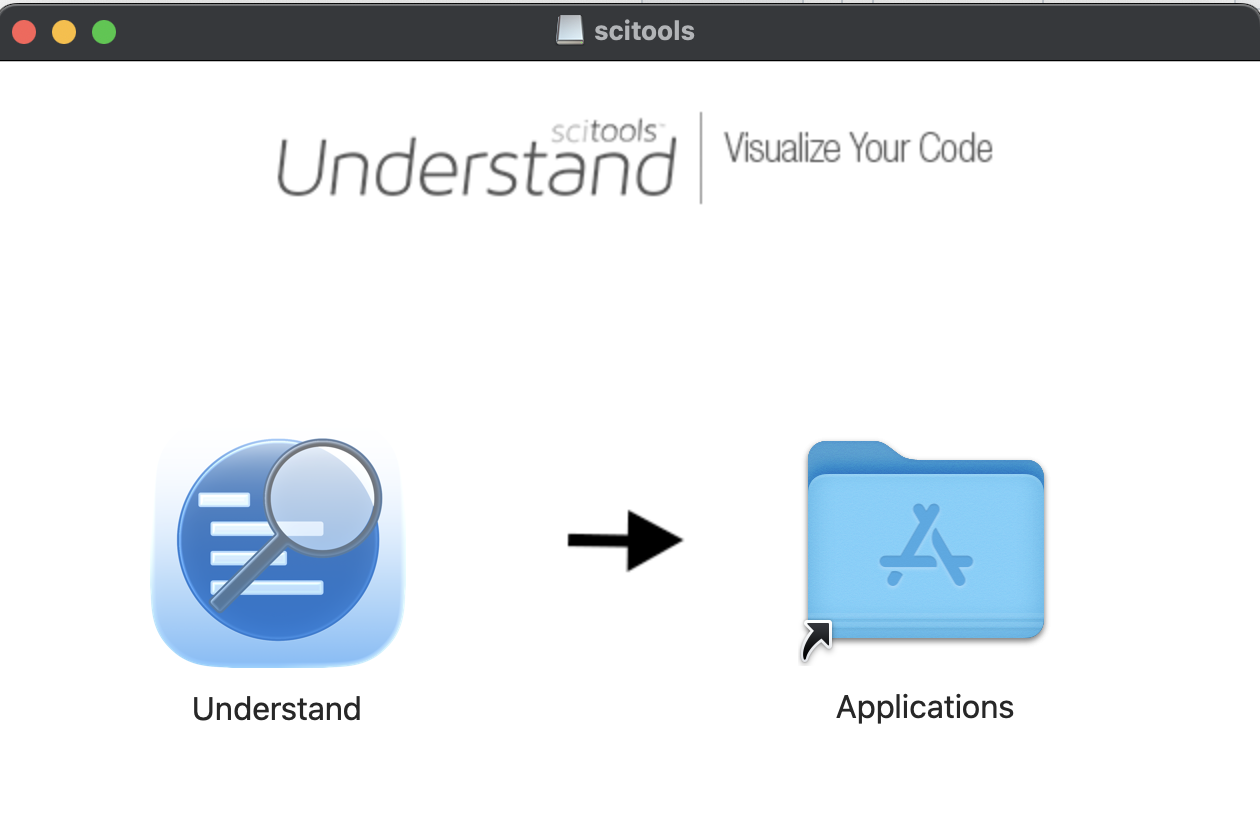
Drag the Understand executable on top of the Applications folder. This will move all the needed files to the Applications directory.

To run Understand, simply double-click the Understand icon from the Applications directory.
On newer versions of macOS, you may see an error stating that “Understand.app can’t be opened because it is from an unidentified developer.”
If this happens, the easiest workaround is to right-click the app and choose Open.
This message comes from macOS’s security feature called Gatekeeper. Although Understand is a signed application, it loads some libraries from outside the app bundle. Because of this, Gatekeeper may incorrectly flag the app as coming from an unidentified developer.